Re: Fw: window theme and background color
| From: | kksou | Date: | Mon, 18 Sep 2006 02:40:07 +0000 |
| Subject: | Re: Fw: window theme and background color | ||
| References: | 1 | Groups: | php.gtk.general |
| Request: | Send a blank email to php-gtk-general+get-7247@lists.php.net to get a copy of this message | ||
thomas favennec wrote:
>
>
> But Window theme hide the background color of buttons.
>
> Can i delete the " window theme appearance " of only one windget in a
> php-gtk script ?
>
> This is automatic with " $style->bg[0]=$color " but not work with "
> $widget->modify_bg($color) "
>
>
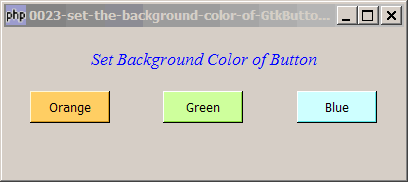
Are you trying to set the background color of a button, something like this?
http://www.kksou.com/php-gtk2/gif/0023.gif
You can set it using modify_bg as follows:
$button = new GtkButton($button_label);
$button->modify_bg(Gtk::STATE_NORMAL, GdkColor::parse($bg_color));
Here's the complete sample code:
> $window = &new GtkWindow();
> $window->connect_simple('destroy', array( 'Gtk',
> 'main_quit'));
> $window->set_size_request(400,150);
>
> $window->add($vbox = new GtkVBox());
>
> // display title
> $title = new GtkLabel("Set Background Color of Button");
> $title->modify_font(new PangoFontDescription("Times New Roman Italic
> 10"));
> $title->modify_fg(Gtk::STATE_NORMAL, GdkColor::parse("#0000ff"));
> $title->set_size_request(-1, 60);
> $vbox->pack_start($title, 0, 0);
>
> $vbox->pack_start($hbox=new GtkHBox(), 0, 0); // note 1
> create_button($hbox, 'Red', "#FF3333"); // note 2
> create_button($hbox, 'Green', '#66FF66');
> create_button($hbox, 'Blue', '#0066FF');
>
> function create_button($hbox, $button_label, $bg_color) { // note 2
> $button = new GtkButton($button_label);
> $button->set_size_request(80, 32); // note 3
> $button->modify_bg(Gtk::STATE_NORMAL, GdkColor::parse($bg_color)); //
> note 4
> $hbox->pack_start($button, 1, 0); // note 5
> $button->connect('clicked', "on_button", $button_label); // note 6
> }
>
> function on_button($button, $button_label) { // note 7
> echo "You have clicked: $button_label!\n";
> }
>
> $window->show_all();
> Gtk::main();
>
http://www.kksou.com/php-gtk2/articles/set-the-background-color-of-GtkButton.php
More explanation here ...
--
View this message in context: http://www.nabble.com/Fw%3A-window-theme-and-background-color-tf2205592.html#a6356809
Sent from the Php - GTK - General forum at Nabble.com.