Re: Row color in GtkTreeView
| From: | kksou | Date: | Sat, 23 Sep 2006 07:34:11 +0000 |
| Subject: | Re: Row color in GtkTreeView | ||
| References: | 1 2 3 4 5 | Groups: | php.gtk.general php.gtk.general |
| Request: | Send a blank email to php-gtk-general+get-7263@lists.php.net to get a copy of this message | ||
Eduardo RBS wrote:
>
> .. all the TreeView is in one
> color
> I want each row (depending of the value) to be in one color...
> like ... if age > 18 the row in blue.. but if the age<=18 the row is red..
> ok?
> with $cell_renderer->set_property I can only set the color of the all the
> TreeView, but I want to set color of one row each time..
>
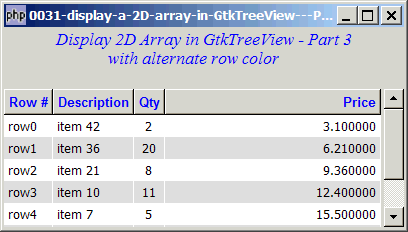
To save the time off some people who are trying to display alternate row
colors in GtkTreeView, here's a sample code to produce the following:
http://www.kksou.com/php-gtk2/gif/0031.gif
Sample code:
<?php
$window = new GtkWindow();
$window->set_size_request(400, 200);
$window->connect_simple('destroy', array('Gtk','main_quit'));
$window->add($vbox = new GtkVBox());
// display title
$title = new GtkLabel("Display 2D Array in GtkTreeView - Part 3\n
with alternate row color");
$title->modify_font(new PangoFontDescription("Times New Roman Italic 10"));
$title->modify_fg(Gtk::STATE_NORMAL, GdkColor::parse("#0000ff"));
$title->set_size_request(-1, 40);
$vbox->pack_start($title, 0, 0);
$vbox->pack_start(new GtkLabel(), 0, 0); // add a small gap between the
title and scroll_win
// Set up a scroll window
$scrolled_win = &new GtkScrolledWindow();
$scrolled_win->set_policy( Gtk::POLICY_AUTOMATIC, Gtk::POLICY_AUTOMATIC);
$vbox->pack_start($scrolled_win);
// the 2D table
$data = array(
array('row0', 'item 19', 2, 3.1),
array('row1', 'item 16', 20, 6.21),
array('row2', 'item 13', 8, 9.36),
array('row3', 'item 10', 11, 12.4),
array('row4', 'item 7', 5, 15.5),
array('row5', 'item 4', 17, 18.6),
array('row6', 'item 3', 20, 21.73));
display_table ($scrolled_win, $data);
function display_table($scrolled_win, $data) {
// Creates the list store
$model = new GtkListStore(Gtk::TYPE_STRING, Gtk::TYPE_STRING,
Gtk::TYPE_LONG, Gtk::TYPE_DOUBLE);
$field_header = array('Row #', 'Description', 'Qty',
'Price');
$field_justification = array(0, 0, 0.5, 1);
// Creates the view to display the list store
$view = new GtkTreeView($model);
$scrolled_win->add($view);
// Creates the columns
for ($col=0; $col<count($field_header); ++$col) {
$cell_renderer = new GtkCellRendererText();
$cell_renderer->set_property("xalign", $field_justification[$col]);
$column = new GtkTreeViewColumn($field_header[$col], $cell_renderer,
'text', $col);
$column->set_alignment($field_justification[$col]);
$column->set_sort_column_id($col);
// set the header font and color
$label = new GtkLabel($field_header[$col]);
$label->modify_font(new PangoFontDescription("Arial Bold"));
$label->modify_fg(Gtk::STATE_NORMAL, GdkColor::parse("#0000FF"));
$column->set_widget($label);
$label->show();
// set alternate row color
$column->set_cell_data_func($cell_renderer, "format_col"); // note 1
$view->append_column($column);
}
for ($row=0; $row<count($data); ++$row) {
$values = array();
for ($col=0; $col<count($data[$row]); ++$col) {
$values[] = $data[$row][$col];
}
$model->append($values);
}
}
// self-defined function to display alternate row color
function format_col($column, $cell, $model, $iter) {
$path = $model->get_path($iter); // get the current path
$row_num = $path[0]; // note 2
$row_color = ($row_num%2==1) ? '#dddddd' : '#ffffff'; // sets the row
color for odd and even rows
$cell->set_property('cell-background', $row_color); // sets the
background color!
}
$window->show_all();
Gtk::main();
?>
More explanations here:
http://www.kksou.com/php-gtk2/articles/display-a-2D-array-in-GtkTreeView---Part-3-(with-alternate-row-color).php
--
View this message in context: http://www.nabble.com/Row-color-in-GtkTreeView-tf1234236.html#a6459571
Sent from the Php - GTK - General mailing list archive at Nabble.com.