Re: gtk read result of combobox
| From: | kksou | Date: | Tue, 19 Sep 2006 02:04:43 +0000 |
| Subject: | Re: gtk read result of combobox | ||
| References: | 1 2 | Groups: | php.gtk.general |
| Request: | Send a blank email to php-gtk-general+get-7253@lists.php.net to get a copy of this message | ||
jerik wrote:
>
> Found a good and working example ;)
> http://gtk.php.net/manual1/en/gtk.gtkcombo.constructor.php
>
Note that the above only works for php-gtk1.
For those who are on php-gtk2, the example in the php-gtk2 documentation
http://gtk.php.net/manual/en/gtk.gtkcombobox.constructor.php
only shows you
how to setup the combobox. It doesn't show you how to get the selection.
To get the user selection from combobox, use:
$model = $combobox->get_model();
$selection = $model->get_value($combobox->get_active_iter(), 0);
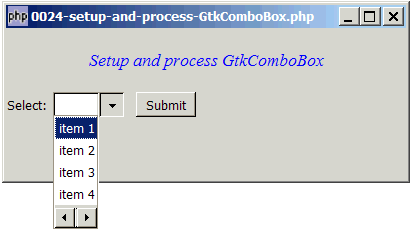
Here's a sample code that will produce the following:
http://www.kksou.com/php-gtk2/gif/0024.gif
$window = &new GtkWindow();
$window->connect_simple('destroy', array( 'Gtk', 'main_quit'));
$window->set_size_request(400,150);
$window->add($vbox = new GtkVBox());
// display title
$title = new GtkLabel("Setup and process GtkComboBox");
$title->modify_font(new PangoFontDescription("Times New Roman Italic 10"));
$title->modify_fg(Gtk::STATE_NORMAL, GdkColor::parse("#0000ff"));
$title->set_size_request(-1, 60);
$vbox->pack_start($title, 0, 0);
// the selection
$list = array('item 1', 'item 2', 'item 3', 'item 4');
$vbox->pack_start($hbox=new GtkHBox(), 0, 0);
$hbox->pack_start(new GtkLabel('Select: '), 0, 0);
// Create a combobox
$combobox = new GtkComboBox();
// Create a model.
$model = new GtkListStore(Gtk::TYPE_STRING);
// Set up the combobox
$combobox->set_model($model); // note 1
$cellRenderer = new GtkCellRendererText(); // note 2
$combobox->pack_start($cellRenderer);
$combobox->set_attributes($cellRenderer, 'text', 0); // note 3
// Stuff the choices in the model
foreach($list as $choice) {
$model->append(array($choice));
}
// Set up a hbox to contain the combobox as well as the Submit button
$hbox->pack_start($combobox, 0, 0);
$hbox->pack_start($button = new GtkLabel(' '), 0, 0);
$hbox->pack_start($button = new GtkButton('Submit'), 0, 0);
$button->set_size_request(60, 24);
// Set up the event handler to respond to button click
$button->connect('clicked', "on_button", $combobox); // note 4
// The callback function that is called when user clicks the submit button
function on_button($button, $combobox) {
$model = $combobox->get_model(); // note 5
$selection = $model->get_value($combobox->get_active_iter(), 0); // note
6
echo "You have selected: $selection!\n";
}
$window->show_all();
Gtk::main();
http://www.kksou.com/php-gtk2/articles/setup-and-process-GtkComboBox.php
More explanations here...
--
View this message in context: http://www.nabble.com/gtk-read-result-of-combobox-tf2290752.html#a6380748
Sent from the Php - GTK - General mailing list archive at Nabble.com.